🌐 Need another language? Tap the Safari icon in the top-right button to open this page, then tap the translate icon in the address bar to switch to any language.
New Release

Build a Complete Personal Glucose Observation System

Safeguarding your long-term health and well-being. Connect blood glucose, diet, exercise, and medication data to help you understand how daily lifestyle factors affect your blood sugar and find a rhythm that works for you.
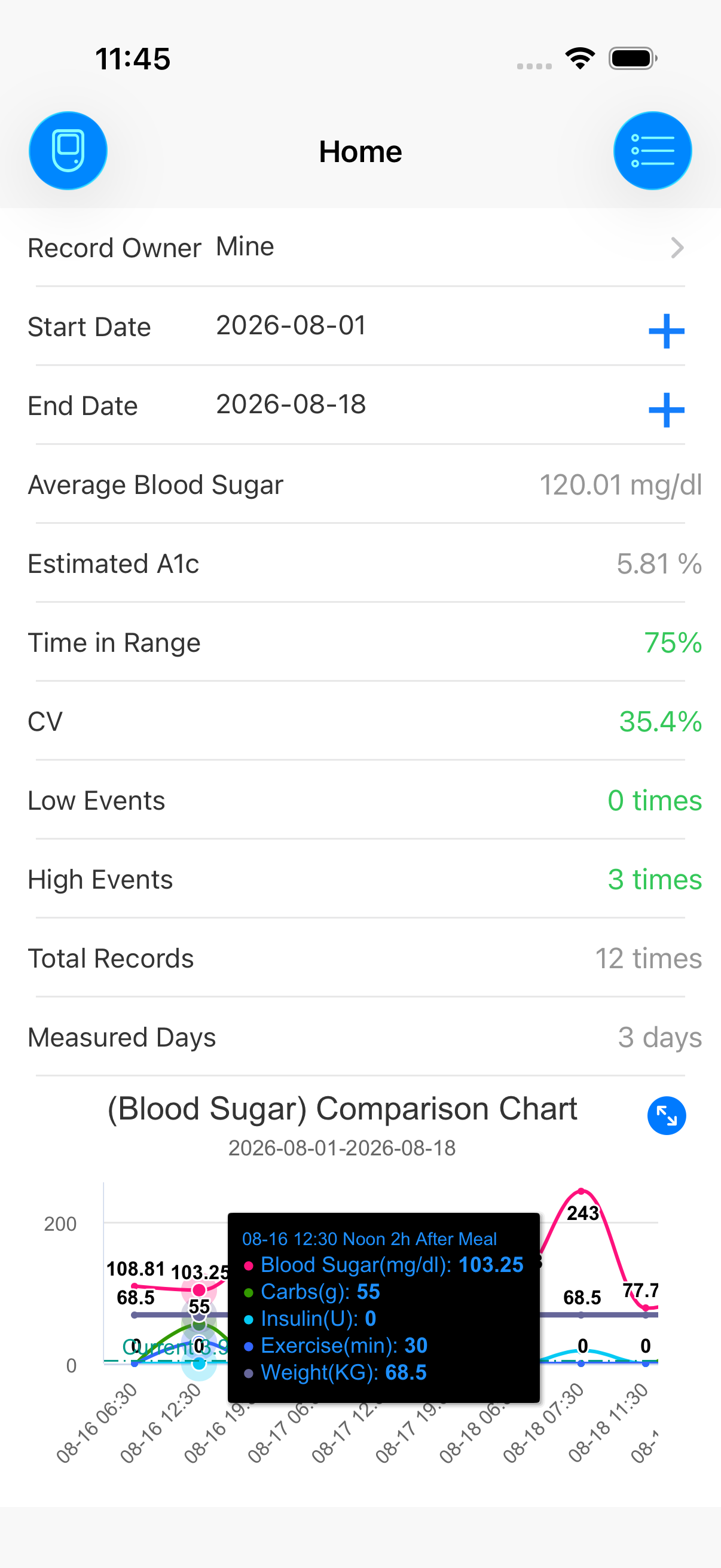
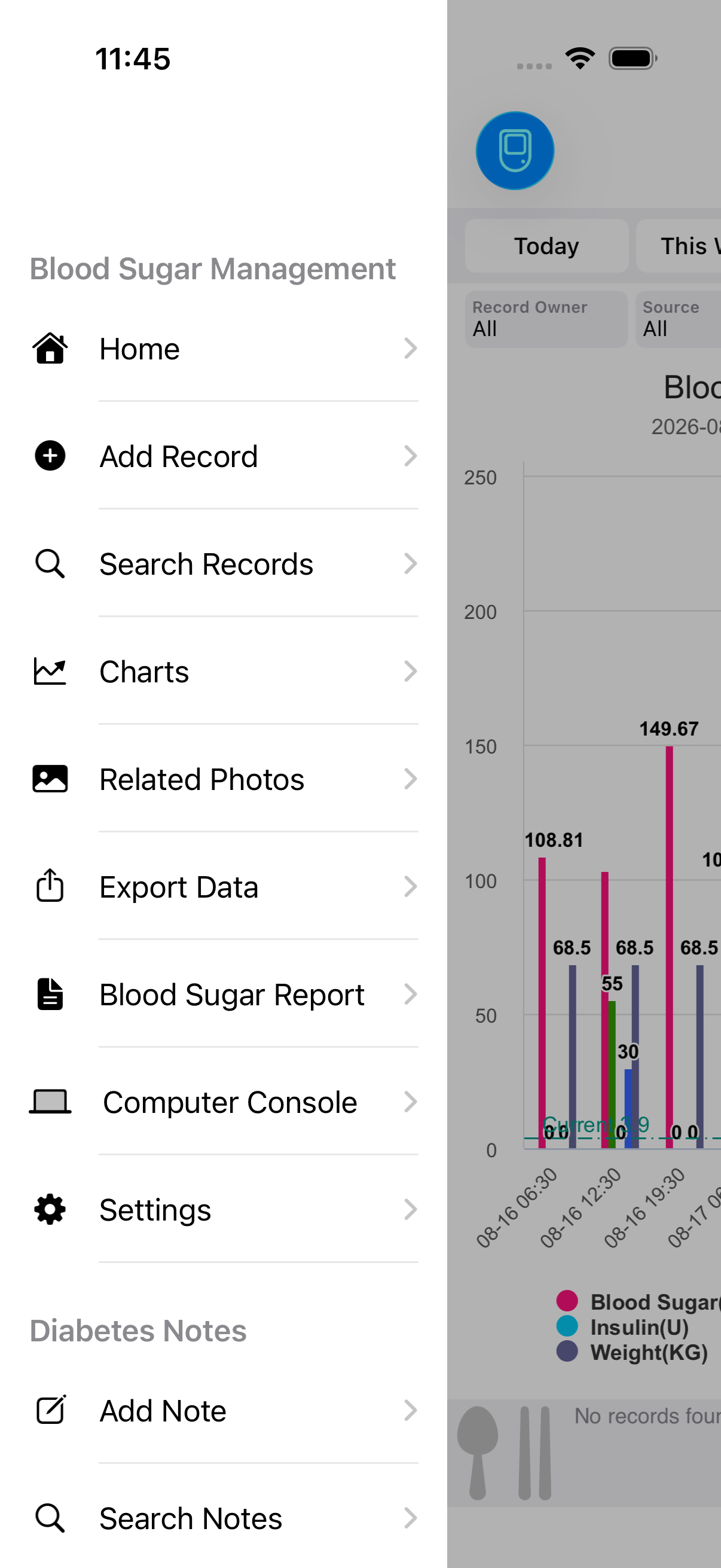
BloodSugar Home Screen

Powerful features. Simply done.

From logging to analytics β€” your entire glucose toolkit, right in your pocket.

✚

Log Glucose

Quickly record glucose values, date, time period (morning/noon/night/bedtime/random) and check type (fasting/pre-meal/1h/2h/3h post-meal). Also log medications, diet, exercise, water intake, insulin, blood pressure, weight, and carbs with optional photos like meal pictures.

πŸ“Š

Trend Charts

Bar, line, spline, and area chart styles at your fingertips. Landscape support with automatic dark mode adaptation. Add personal target thresholds directly on the chart to visualize whether readings stay on track.

πŸ“‹

Glucose Reports

Automatically generated reports with TIR (Time in Range), estimated HbA1c, CV (Coefficient of Variation), standard deviation and other clinical-grade metrics. Print, email, or copy with a single tap to share with your doctor.

πŸ’»

PC Dashboard

When your phone and computer are on the same Wi-Fi, manage all glucose records through any desktop browser β€” view, add, edit, export. No cables required, plus full analytics dashboards.

πŸ“–

Glucose Journal

Write daily diabetes management notes in Markdown with photo support and exportable PDFs. Search by keyword to revisit your journey at any time.

πŸ₯

Medical Records

Store visits: hospital name, department, doctor, exam items, diagnosis, prescriptions, bills, and photos (lab reports, prescriptions). Quick-searchable before the next appointment.

πŸ””

Smart Reminders

Set reminders for glucose checks, medication, insulin injections, and exercise β€” daily / weekly / monthly recurrence. Post-prandial recheck reminders (15–120 min) keep meal-time trends visible.

🍎

Apple Health Sync

Full bidirectional sync with Apple Health. Glucose meters and closed-loop systems import automatically. Home Screen widgets show your latest reading without even opening the app.

Glucose Charts

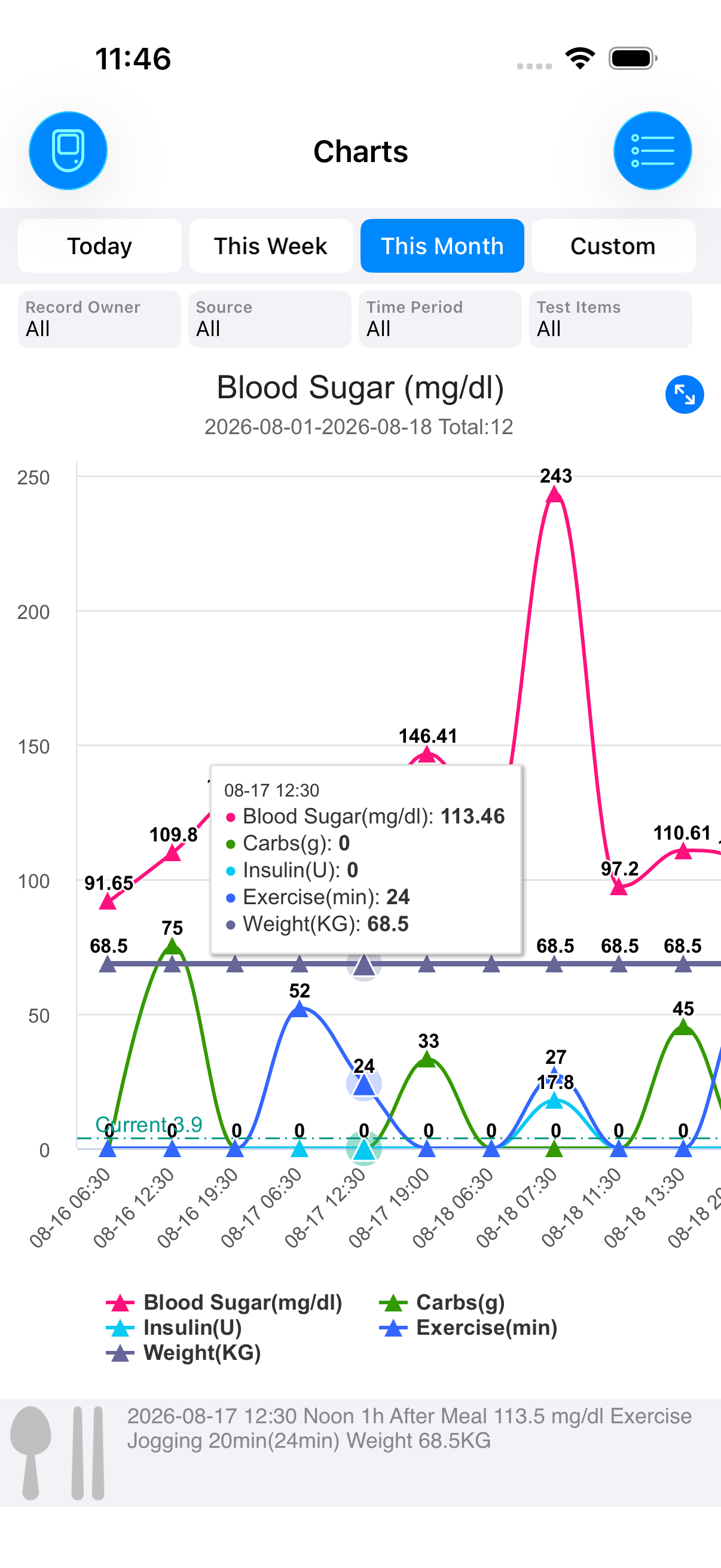
Turn data into
trends you can read at a glance.

Bar charts show range at a glance. Line charts capture daily drift. Smooth splines reveal long-term patterns. Overlay personal control targets to assess adherence instantly.

Glucose bar chart
Glucose Search

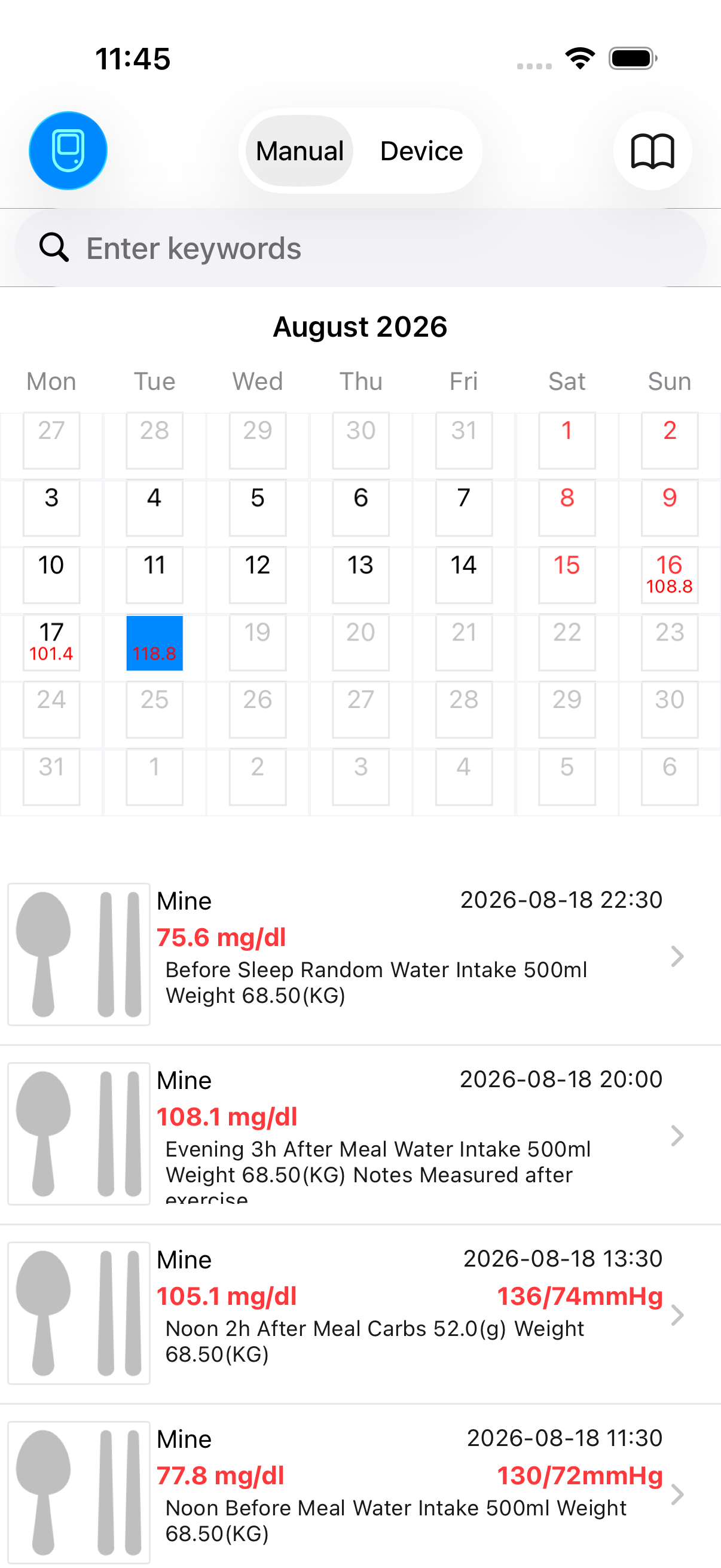
Calendar view.
A whole month, crystal clear.

Tap a date for that day's readings, swipe to browse months. Search by any keyword. Manual entries and device imports kept separate so you always know where data came from.

Glucose search calendar
Glucose Report

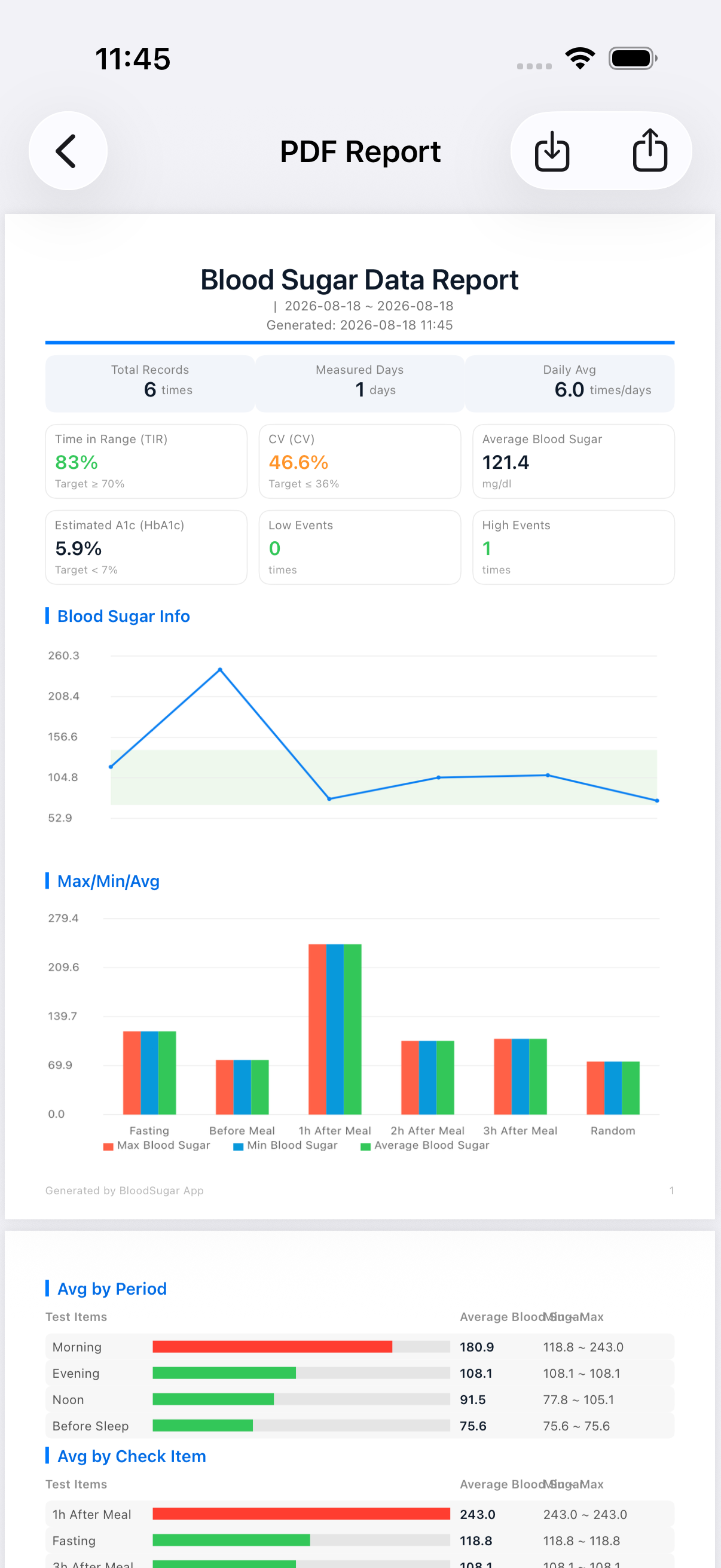
Clinical metrics.
Ready for your next visit.

TIR, estimated HbA1c, coefficient of variation, standard deviation β€” all generated automatically. Print it, email it, or copy it straight into your favorite AI tool for interpretation.

Glucose report
Log Entry

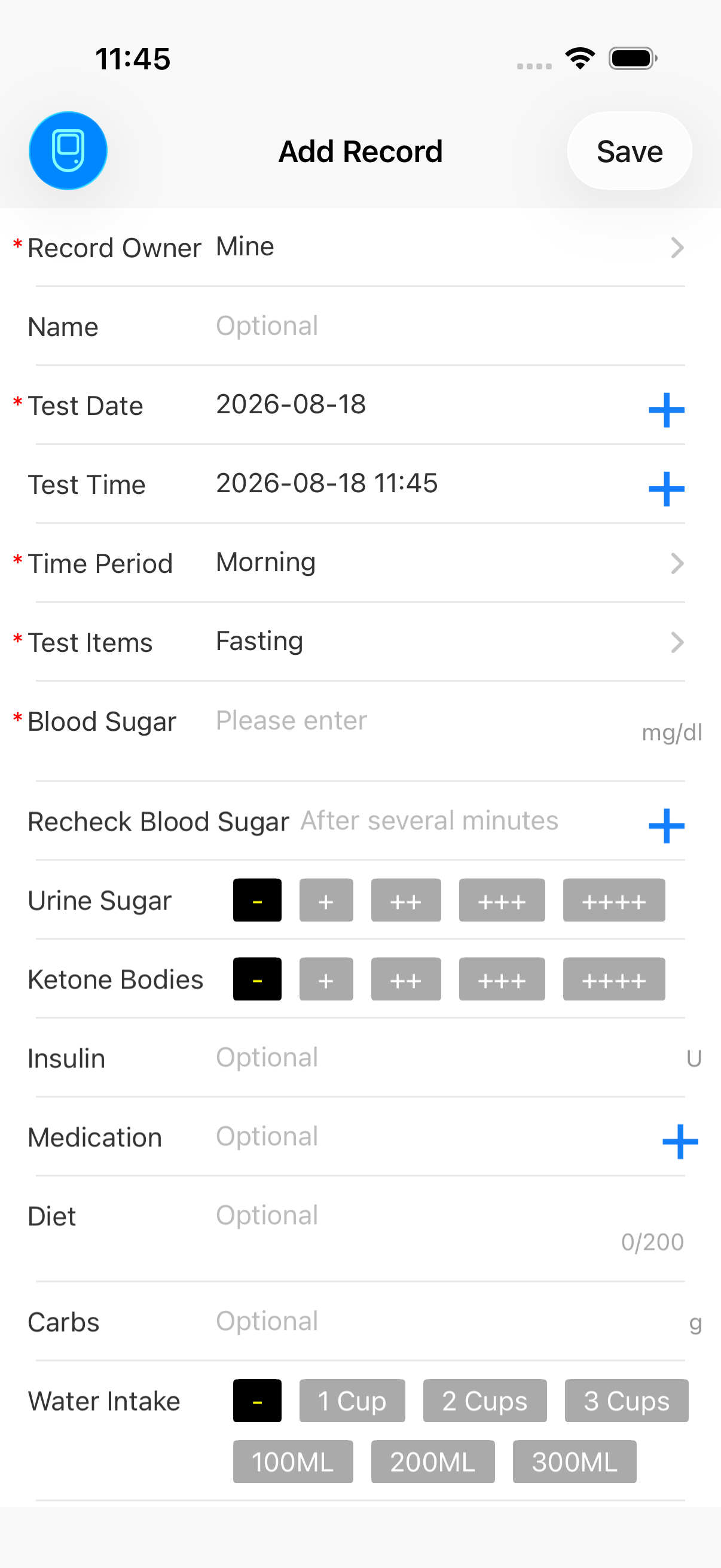
One entry.
Everything captured.

Glucose, medication, diet, exercise, water, insulin, blood pressure, weight, carbs, photo β€” all on one screen. Post-prandial recheck reminders set immediately so meal trends aren't missed.

Add glucose entry
Long-term Trend

Continuous trends
make progress visible.

Multi-week line charts compare average glucose across time periods, highlighting what truly affects your readings and revealing the impact of every lifestyle choice.

Long-term glucose trend

Everyday tools. All built in.

No more juggling apps β€” one BloodSugar installation handles your complete toolkit.

🌐

Online Lookup

Built-in browser for health references and AI-assisted report analysis.

βš–οΈ

BMI Calculator

Height and weight in, body mass index out β€” in a single tap.

πŸ”¬

HbA1c Converter

Convert average glucose to estimated HbA1c for quick interpretation.

🍚

Carb Calculator

Estimate carb content of meals to aid diabetes-friendly eating.

Start tracking every reading today.

Available in 22 languages inside the app. Auto dark-mode. All data stored locally on your device β€” private by default.

How to Use

Getting started is quick. Answers to common steps are here.

πŸš€ Getting Started

  1. First Launch: The Home screen shows an overview of glucose records. It's empty at first β€” open the side menu and tap "Log Glucose" to start your first entry.
  2. Logging Glucose: Choose person β†’ Date & period β†’ Check type β†’ Enter glucose value β†’ Optionally add medication, diet, or exercise β†’ Save.
  3. Viewing Charts: Open "Glucose Charts" from the side menu, pick a time range, and switch between bar or line views to explore trends.
  4. Setting Units: Go to "Settings" β†’ "Glucose Unit" to toggle between mmol/L and mg/dL.

πŸ’» PC Dashboard (Wi-Fi Wireless)

  1. Ensure your phone and computer are on the same Wi-Fi network.
  2. Open "PC Management" from the side menu to see the URL and 6-digit access code.
  3. Type the URL into a desktop browser and enter the code.
  4. Add, edit, delete, search records from "Record Management", view stats in "Report".

🍎 Apple Health Sync

  1. Go to "Settings" and verify the Apple Health switch is enabled.
  2. Authorize access on first use β€” approve the required permissions.
  3. After authorization, up to the last 90 days of glucose data sync automatically.
  4. Bi-directional sync runs each time the app is opened or new data arrives.

πŸ“‘ Generating Reports

  1. Open "Glucose Report" from the side menu.
  2. Pick a timeframe (Today / This Week / This Month).
  3. Review the summary and detailed records.
  4. Print, email, copy to share with doctors β€” or paste straight into your favorite AI tool for analysis.

🎯 Setting Control Targets

Open "Settings" β†’ "Control Targets" and configure your personal target range (e.g., 70–180 mg/dL or 3.9–10.0 mmol/L). The threshold lines appear directly on charts to instantly visualize performance against goals.

FAQ

Quick answers to questions you might have.

Q Why is the glucose unit not what I expect?
A Go to "Settings" β†’ "Glucose Unit" to switch between mmol/L and mg/dL.
Q How do I delete glucose records?
A Swipe left on any record in the list to reveal the delete button. For device-synced records from Apple Health, tap the top-right Edit button, then tap the Select-All option at the bottom and choose the records to remove. You can also use the PC Management page from the side menu to delete entries from a desktop browser.
Q I don't receive notification alerts or reminders won't save.
A Go to iOS Settings β†’ Notifications β†’ find "BloodSugar" β†’ enable "Allow Notifications". Reminders cannot be saved without notification permission.
Q Can I modify a saved glucose value?
A Tap the record to open the detail screen, edit values directly, and save.
Q I denied Apple Health authorization earlier β€” how do I re-enable it?
A Open iOS Settings β†’ Privacy & Security β†’ Health β†’ find "BloodSugar" and re-enable the required health data permissions. Data sync with Apple Health requires these permissions to be active.
Q What if I have more questions?
A Tap "Feedback" in the side menu to send us a message. We respond within 24 hours.